The Manage Sales Quotations - Version 2 is the new fiori app available from SAP S/4HANA 2022. It allows you to manage sales quotations more efficiently.
Manage Sales Quotations - Version 2
- Manage Sales Quotations - Version 2
- Overview
- Technical Details
- Sales Quotations List
- Create Sales Quotations
- Change Sales Quotations
- Sales Quotations Status
- Sales Quotations Process Flow
- Sales Quotations Output Items & Attachments
- Sales Quotations UI Adaptation
- What’s New in SAP S/4HANA 2023
- Summary
- Related Notes
Overview
The Manage Sales Quotations - Version 2 fiori app allows you to create sales quotations, change sales quotations, and display sales quotation details, whereas the old Manage Sales Quotations app requires you to navigate across other apps to perform the preceding tasks.
Technical Details
| SAP Fiori Apps Library ID | F5630 |
|---|---|
| Scope Item | BDG (Sales Quotation) |
| Application Component | SD-SLS-QUT (Sales Inquiries / Quotations) |
| Valid as of | SAP S/4HANA 2022 |
It is available in the group Sales Quotations or in the group Quotations and Contracts when Spaces are used. As a prerequisite for using this app to create or changes sales quotations, corresponding sales quotation types must be assigned using the customizing activity:
Sales and Distribution → Sales → App-Specific Settings → Apps for Sales Documents → Manage Sales Quotations - Version 2 → Assign Sales Quotation Types Following are the main features of Manage Sales Quotations Version 2 fiori app:
Sales Quotations List
-
The app allows business enables business users to view a list of sales quotations and perform searches or filtering on the list. Users can navigate into the details by clicking the row.
-
The Fiori app will automatically fill in the fields with the user’s default values for sales organizations, distribution channels, divisions, sales offices, and sales group.
-
Extending the validity of sales quotations that will soon expire can be done directly from the list.
-
Valid sales quotations with Valid To dates in the near future are shown in yellow, while those that have already expired are shown in red.
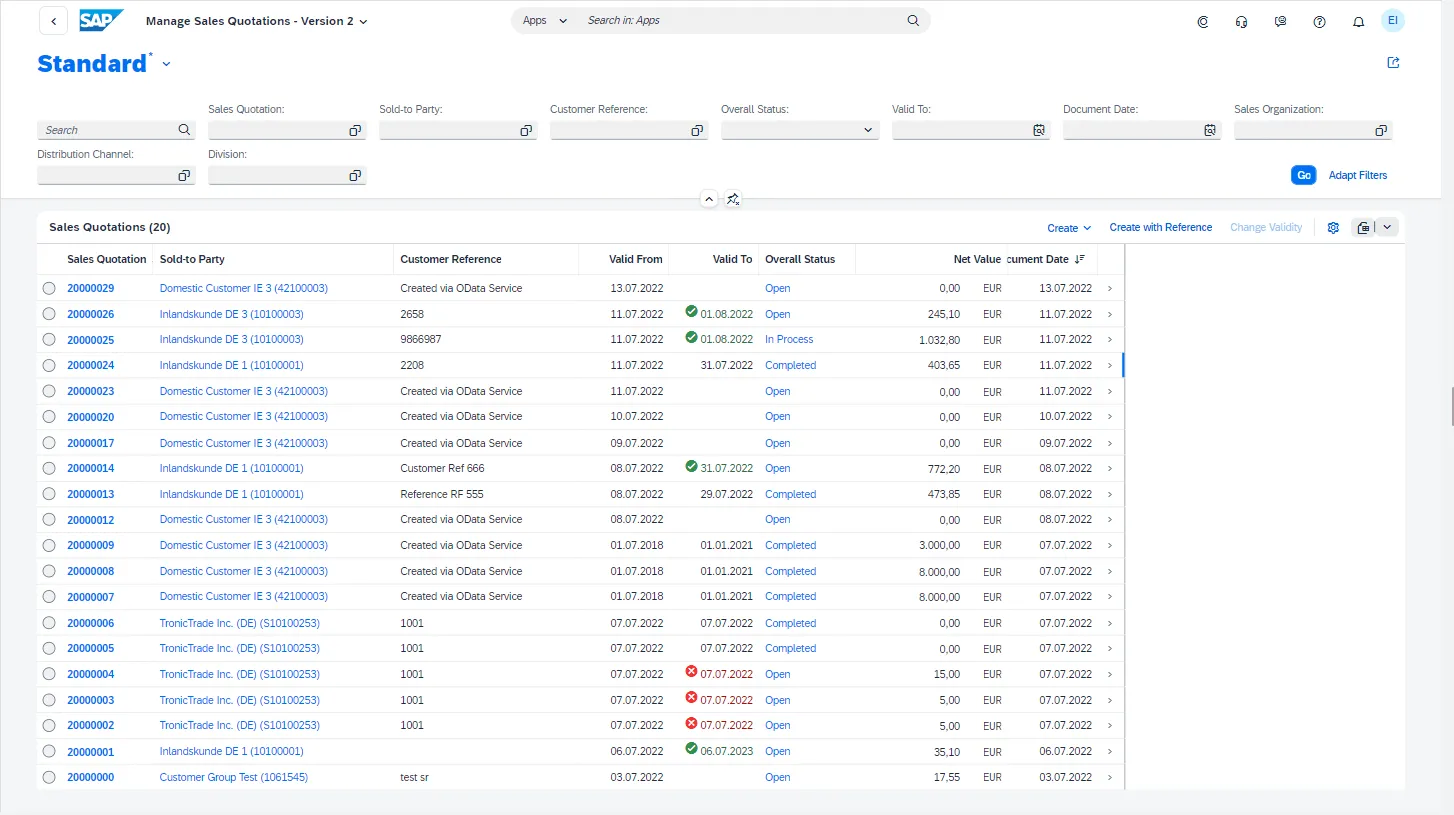
Manage Sales Quotation Worklist
Create Sales Quotations
Users now can choice between a Fiori UI (or) HTML GUI transaction code VA21 to create sales quotations. It is also possible to create a sales quotations with reference to a sales inquiry.
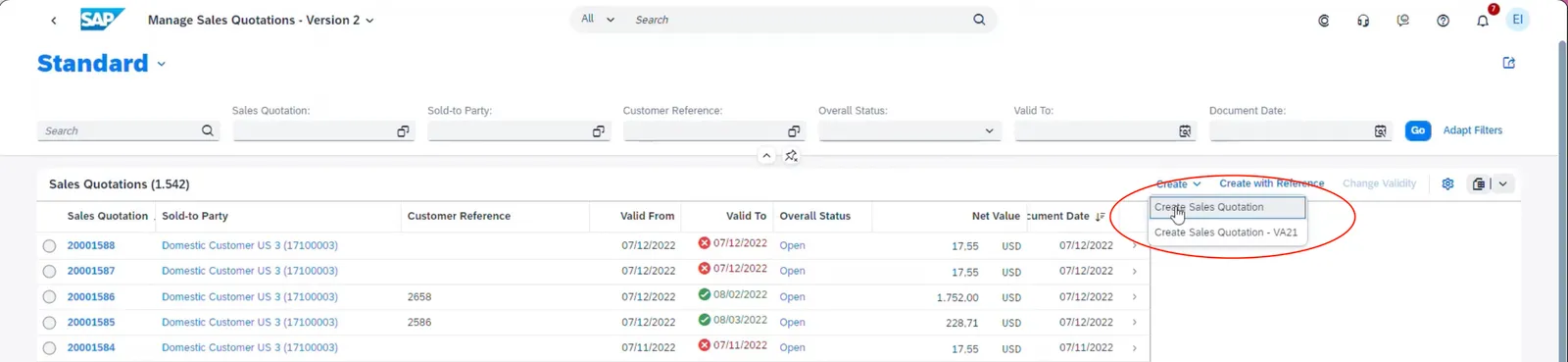
Create Sales Quotation
Sold-To party is mandatory to specify while creating a new sales quotation and can use collection value help to search a sold-to party by entering sold-to party number, name, street, postal code or city.
Ship-To party details are proposed based on BP master data and can be changed if needed.
Header price conditions is maintained in Price section and can be filter condition types using quick filters.
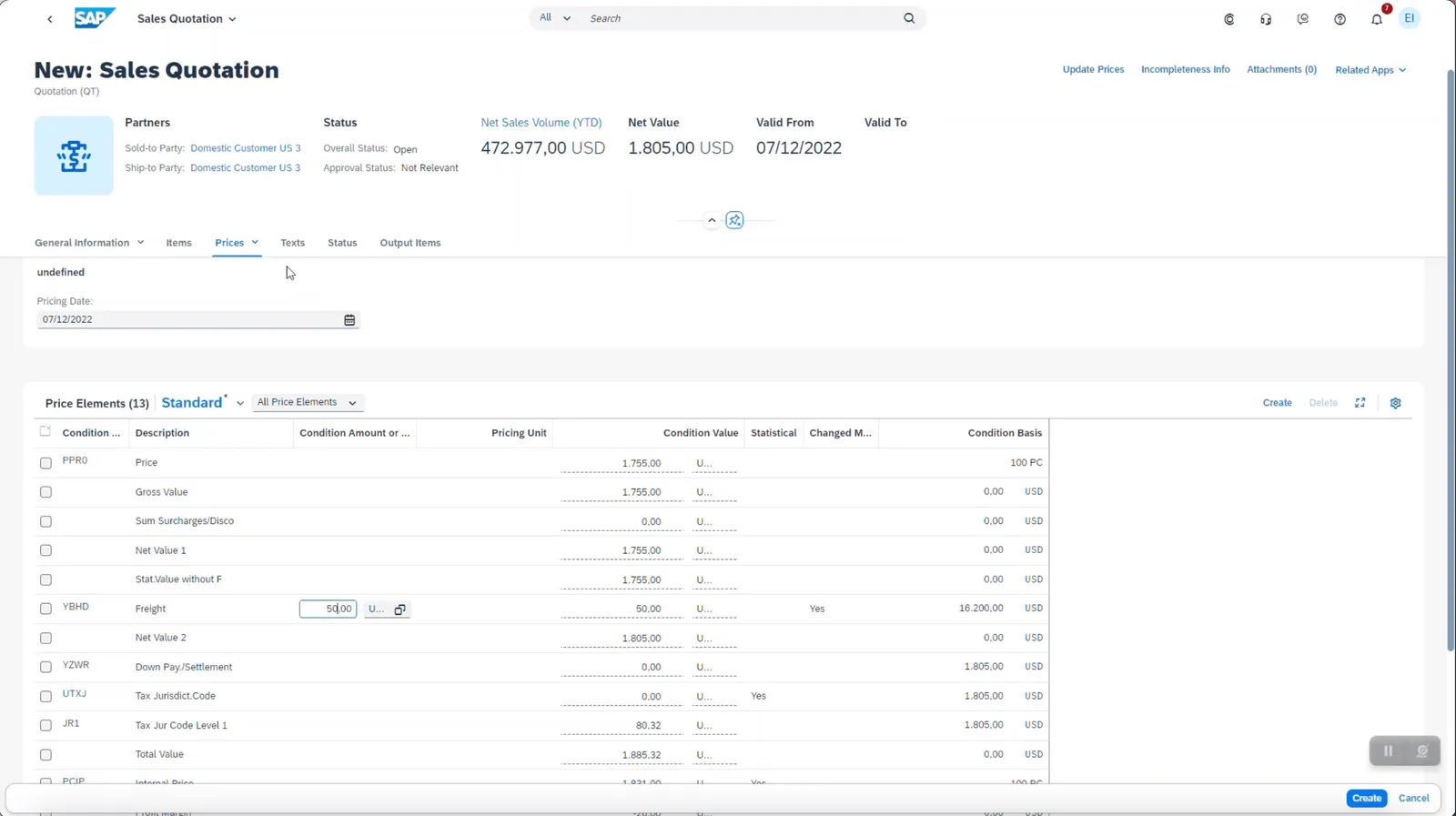
Sales Quotation Pricing
Navigate to Texts sections to include long-text information to the sales quotation header. Choose Create to create a new text and enter Language and Text Type.
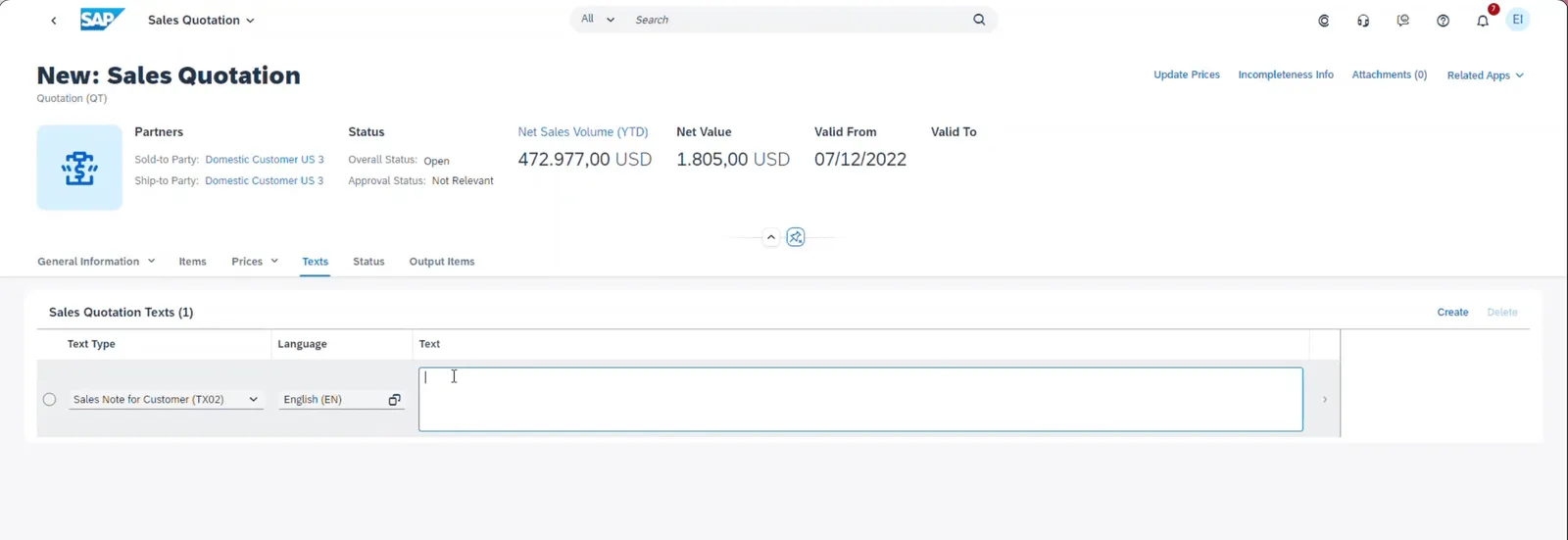
Sales Quotation Header Texts
Navigate to Items section to add line items to the sales quotation. Either a product, a customer material or an item descriptions is needed.
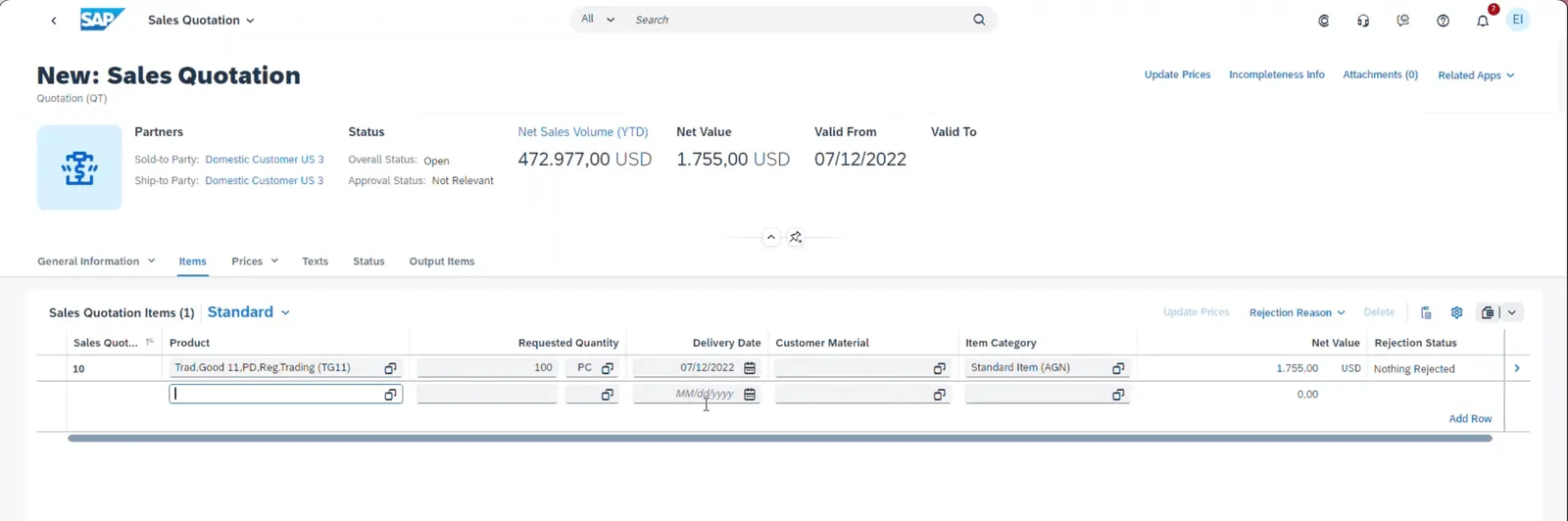
Sales Quotation Items
Change Sales Quotations
It is possible to change the sales quotations using this new version.
-
Actions like Update Prices, show Incompleteness Info, and manage Attachments can be performed from the object details screen.
-
Sales Quotations can not be edited if a workflow has been triggered based on the configuration. Withdraw from Approval can be performed to edit the sales quotations.
Sales Quotations Status
Header and item level statuses can be viewed, allowing you to track different statuses like processing status, approval status, reference status, data incompleteness status and product compliance status
Sales Quotations Process Flow
The process flow provides and overview of preceding and succeeding documents of the sales quotation such as sales orders, delivery, and invoicing and their respective status. It is also possible to navigate to the related fiori apps directly from the process flow.
Sales Quotations Output Items & Attachments
When sales quotation is saved based on the output determination procedure, the system will create relevant output items, which can be viewed in the Output Items section. You can also display a print preview of the sales quotation.
Supporting documents can be added as an attachments by uploading files or adding URLs. Delete and edit the name of the attachments can be performed.
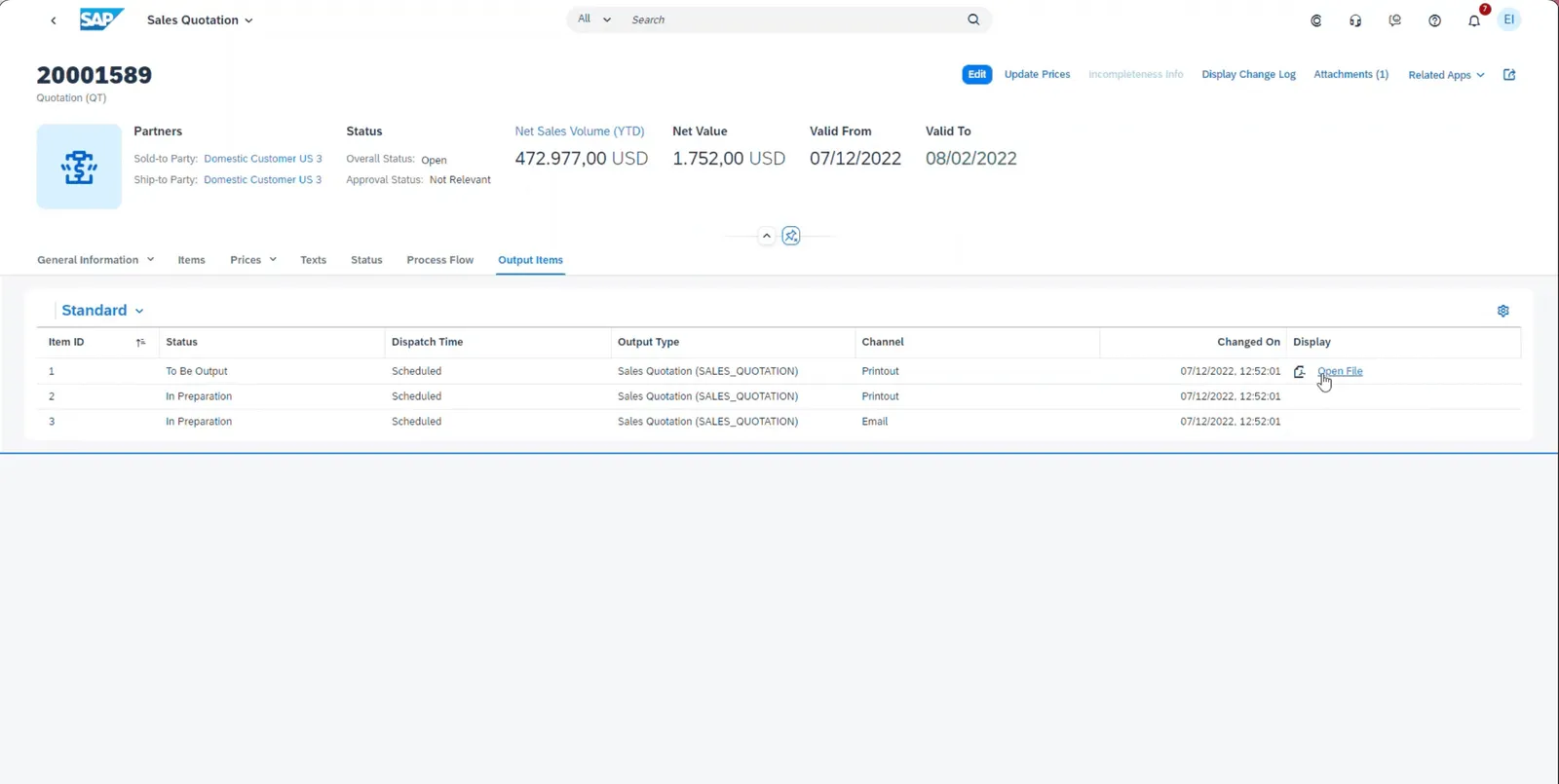
Sales Quotation Output Items
Sales Quotations UI Adaptation
-
A key user who is authorized to make UI adaptations can change the layout of the user interface via runtime adaptation.
-
It is possible to adapt the header section, form views, table columns, and move sections.
-
Firstly navigate to the Fiori Ul of a sales quotation and then choose Adapt Ul.
-
The screen changes into UI Adaptation mode.
-
Visualization mode allows you to display changes to the UI configuration.
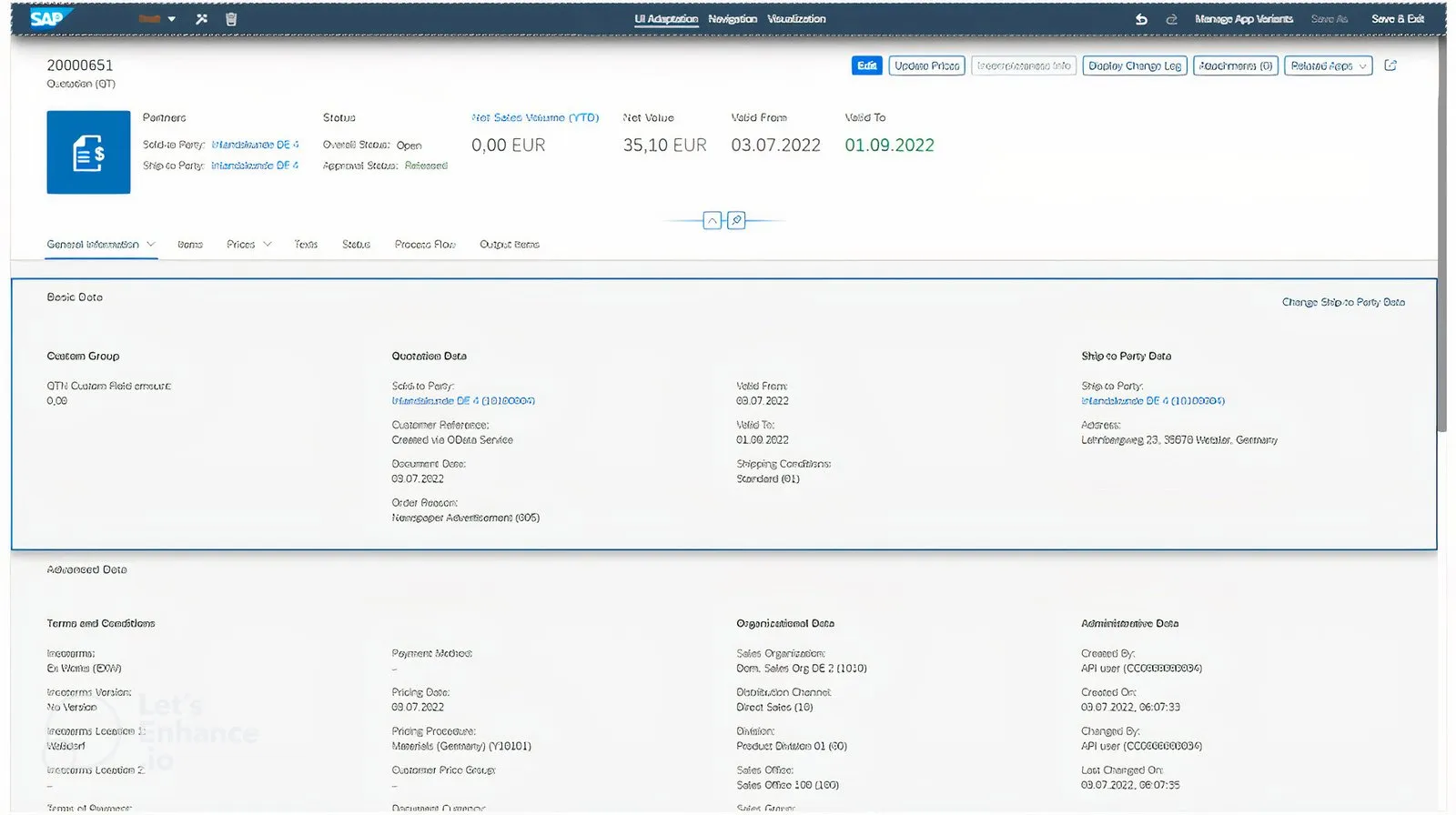
UI Adaptation Mode
What’s New in SAP S/4HANA 2023
In SAP S/4HANA 2023, the Manage Sales Quotations - Version 2 app has been updated to allow you to create subsequent sales orders. You can create a sales order with reference to a selected sales quotation by navigating to the Manage Sales Orders - Version 2 app. The button for creating a subsequent order is available on both the list page and object page.
Please note that the option to create sales quotations using the Create Sales Quotations - VA21 button above the sales quotation list is no longer available. If you still want to use the classic VA21 app, choose an existing quotation number and choose the link to this app.
A subsequent order cannot be created in the following situations:
-
A sales quotation is fully referenced.
-
A sales quotation is fully rejected.
-
A sales quotation is incomplete on header or item level.
-
A sales quotation (relevant for approval) is in approval, rejected, or to be reworked.
Summary
With this new Manage Sales Quotation Version 2 fiori app, you can shorten your sales cycles and win more deals.
-
Delivering compelling sales quotations to customers ensures that you always meet your sales targets.
-
Maintain a competitive advantage by delivering quotes quickly and accurately.
-
With embedded prediction capabilities, sales teams can focus on prioritised quotations.